How Much Does It Cost to Create a Chatbot App like ChatGPT?


6 February, 2026
Since its release in November 2022, ChatGPT has completely changed how people think about technology. This AI-powered chatbot, built using natural language processing (NLP), has shown the world what artificial intelligence is truly capable of. It makes the tasks easier through:
- Answer complex questions
- Help students with exams
- Write speeches
- Support marketers
- Assist developers in writing and fixing code.
Almost every industry has felt the impact of this AI innovation. This excitement around ChatGPT grew even more after Microsoft made another major investment in it, its third since 2019. This move was so impactful that Google reportedly announced a “code red,” seeing ChatGPT as a serious challenge to its dominance in search.
Today, companies worldwide are inspired by what ChatGPT can do and are eager to build similar AI solutions for their own businesses. Even at The Hashtech, we were equally impressed by the disruption ChatGPT created in the tech space.
To help our audience understand this trend better, we decided to share our expert knowledge on how to create an app like ChatGPT. We’ll also discuss the estimated cost of developing such an application, which can be anywhere from $500,000 to several million dollars, depending on features and complexity.
In this guide, we’ll walk you through both the business and technical aspects of creating a ChatGPT-like chatbot. But before getting into the technical details, let’s first understand what ChatGPT really is and how it works.
ChatGPT’s revenue reached $1.2 billion in 2023, a 300% jump compared to 2022.
Tap Into This Fast-Growing Market with The Hashtech
Get in Touch With Us Today
What Is ChatGPT and Why Is Everyone Talking About It?
At its core, ChatGPT is a chatbot, but calling it just a chatbot doesn’t do it justice. It is an advanced artificial intelligence system created by OpenAI using natural language processing (NLP). The model is built on the Generative Pre-trained Transformer (GPT) architecture, which allows it to understand and generate human-like text.
Simply put, ChatGPT is designed to read user input, understand the meaning behind it, and respond in a clear and natural way. It can hold conversations, answer questions, explain complex topics, and create content across many subjects with impressive accuracy and flow.
For a long time, AI chatbots struggled to communicate like humans. Their responses were limited, repetitive, and often irrelevant. However, recent breakthroughs such as transfer learning and the ability to train models on massive amounts of data have changed everything. These advancements allow ChatGPT to learn language patterns, context, and intent much more effectively.
This leap in AI capability is the main reason behind the massive buzz around ChatGPT. As a result, many businesses are turning to mobile app development services to build similar AI-driven products. The experience feels less like talking to a machine and more like having a conversation with a knowledgeable assistant.
The Growing Progress of ChatGPT
ChatGPT has improved a lot over time. OpenAI has been working on its GPT models for many years, making them smarter and more useful with each version. Important stages in this journey include GPT-3, GPT-4, and tools like the Code Interpreter, which help users solve problems, write code, and analyze data more easily. These updates show how ChatGPT continues to grow and adapt to different needs.
GPT-3: A Major Step in Conversational AI
OpenAI first trained GPT models to understand language by predicting the next word in a sentence. This approach helped early versions learn how language flows naturally. GPT-2 improved this ability and could already produce clear and meaningful text. The real breakthrough came with GPT-3, which became the foundation for ChatGPT. GPT-3 amazed people around the world with its ability to write text that feels very human and well-structured. When ChatGPT was launched, it quickly became popular, reaching one million users in just five days and ten million users within forty days, showing how powerful and useful conversational AI had become.
ChatGPT-4: A New Era of AI Conversations
After the huge success of GPT-3, OpenAI introduced ChatGPT-4 on March 14, 2023. This version is available to premium ChatGPT users and through an API. ChatGPT-4 raised the standard for AI chatbots by improving how well it understands and generates language. It can follow conversations more clearly, handle complex questions, and give more accurate and meaningful answers. With these improvements, ChatGPT-4 became one of the most advanced and reliable language models available.
Code Interpreter: A Powerful New Feature
To make ChatGPT even more useful, OpenAI introduced an advanced tool called the Code Interpreter for ChatGPT Plus users. This feature took chatbots beyond simple conversations and turned ChatGPT into a smart problem-solving assistant. With Code Interpreter, users can create graphs, work with data, edit files, write and test code, and solve mathematical problems. It works like a personal data expert that helps understand complex information and turn it into useful results. From GPT-3 to GPT-4 and now tools like Code Interpreter, ChatGPT has grown into a powerful platform that changes how humans interact with AI. Its rapid development continues, and OpenAI is expected to add more features in the future, including voice and video interaction, virtual assistants, online shopping support, and social media integration.
Key Features of an App Like ChatGPT
To understand the cost of creating an app like ChatGPT, it’s important to look at its main features. The more advanced and complex these features are, the more time and resources it takes to develop the app.
Frontend User Interface Features
The user interface is where people interact with your chatbot, so it should make conversations smooth and natural. A real-time chat system that delivers instant responses is essential for a good experience. Users expect fast, glitch-free interactions that feel seamless.
Having a message history lets users see past conversations and keep context across sessions. This requires smart database design and efficient ways to retrieve large amounts of chat data.
Adding voice-to-text functionality allows users to speak instead of typing, making the chatbot more accessible especially on mobile devices. While this adds some complexity, it greatly improves usability.
Other features like dark/light mode and support for multiple languages make the app more user-friendly and accessible to a global audience. Adding new languages requires careful attention to cultural nuances and proper training of the AI model.
Backend Architecture Features
The backend is the most technically complex part of a ChatGPT-style app. Connecting to AI models whether it’s OpenAI’s GPT, Anthropic’s Claude, or open-source models like Mistral or LLaMA requires careful handling of errors, retries, and backup systems.
Session management keeps track of each user’s conversations, maintains context, and keeps data separate for different users. This becomes more challenging as your app scales to support thousands of users at the same time.
Backend systems also handle token usage and billing, keeping track of how the AI is used and managing costs fairly. User input is processed carefully, with safety checks and optimization, to make sure the chatbot gives helpful and appropriate responses.
Admin Panel Features
The admin panel gives you control and oversight of your chatbot app. Analytics dashboards show how users interact with the app, which features are most popular, and overall usage trends. Logging and tracking systems help monitor performance and catch issues before they affect users.
Rate limiting controls how often users can interact with the AI, preventing misuse and managing costs. Content moderation tools keep conversations safe and aligned with your platform’s rules. API key management ensures secure access to the AI models and protects expensive resources.
Optional Advanced Features
Adding extra features can make your chatbot stand out, but they also increase development complexity. Text-to-speech lets the chatbot respond with voice, making conversations more interactive. Allowing users to upload documents like PDFs or links helps the AI understand context better and provide more useful answers.
Connecting the chatbot to business tools such as CRMs, knowledge bases, or customer support systems can automate workflows and boost productivity. Keep in mind that each integration adds more development effort and ongoing maintenance.
Also Read: Top 15 Apps Like ChatGPT
ChatGPT App Development Cost: An Easy Overview
The cost of creating an app like ChatGPT depends on several important factors. These include how advanced the AI model is, what the app is designed to do, the size and type of data needed, and the computing power required to train and run the model. For example, ChatGPT itself was trained using hundreds of gigabytes of text data, which shows how large the dataset needs to be.
Collecting this amount of data can be expensive. Costs increase if the data comes from paid sources or if human workers are needed to label and organize it. Data labeling costs can range from a few cents to several dollars per task, depending on complexity. Data prices also vary based on where it comes from.
Infrastructure costs are another major factor. Using cloud platforms like AWS, Google Cloud, or Microsoft Azure can cost anywhere from a few hundred dollars per month to several thousand dollars per month. This depends on how much computing power and storage the app uses and how long it runs. On top of this, building the user interface and overall app design also adds to the total cost.
Overall, developing a ChatGPT-like application can cost anywhere from around $500,000 to several million dollars. The development process may take a few months or even more than a year, depending on the project scope. Tools such as AI content detection systems usually fall within a similar cost range.
From improving efficiency to cutting costs, we help you make AI work for your business.
Drive Smarter Business with The Hashtech
Check Out Our Services Today
Realistic Cost Breakdown
To answer how much it costs to create an app like ChatGPT, it helps to look at the individual parts that make up the project and their estimated costs. Below is a detailed breakdown based on typical development needs and current market prices:
Design and User Experience: $5,000–$10,000
This includes creating easy-to-use chat interfaces, designing layouts that work well on both web and mobile, and making sure the app is accessible for all users. Good design helps users enjoy the app and keeps them coming back.
Frontend Development: $10,000–$20,000
This covers building the chat interface that users interact with. It includes real-time messaging, saving and showing message history, login and authentication screens, and making sure the app works smoothly on both web and mobile. Modern frameworks like React, Vue.js, or Flutter are usually used for this.
Backend Development: $15,000–$25,000
This involves building the server side of the app, including managing user sessions, connecting to AI model APIs, handling logins and permissions, designing and optimizing databases, and setting up scalable infrastructure. Backend development is usually the most technically challenging part of the project.
AI/Language Model Integration: $8,000–$15,000
This covers linking your app to AI language models through APIs. It includes handling errors, optimizing responses, managing usage tokens, and implementing safety checks. Doing this requires expertise in AI APIs and best practices.
Admin Dashboard Development: $7,000–$12,000
This involves building the admin panel to manage your chatbot app. It includes analytics to track user behavior, monitoring system performance, tools for moderating content, and controls like rate limiting to manage usage. These features are key for running and scaling the app smoothly.
Security and Authentication: $5,000–$10,000
This covers keeping your chatbot app safe. It includes login systems like OAuth and single sign-on (SSO), controlling user access with roles, encrypting data, and following standard security practices to protect user information.
Testing and Quality Assurance: $4,000–$8,000
This includes thoroughly testing your chatbot app to make sure it works correctly. It covers checking all features, improving performance, testing security, and getting feedback from users across different devices and platforms.
Infrastructure Setup: $8,000–$15,000
This covers setting up the cloud environment for your chatbot. It includes configuring servers, enabling auto-scaling, setting up a content delivery network (CDN), optimizing databases, and deploying monitoring tools to keep everything running smoothly.
Annual Maintenance: $10,000–$25,000
Ongoing maintenance includes fixing bugs, updating security, adding new features, managing the infrastructure, and providing technical support to keep the chatbot running smoothly.
Estimated Total Investment:
- MVP Version: $60,000 – $100,000
- Full-Feature App: $120,000 – $200,000+
Keep in mind that API usage costs are recurring and depend on how much users interact with the chatbot. More usage means higher ongoing costs, which should be considered in your pricing and business planning.
Main Factors Driving Chatbot Development Costs
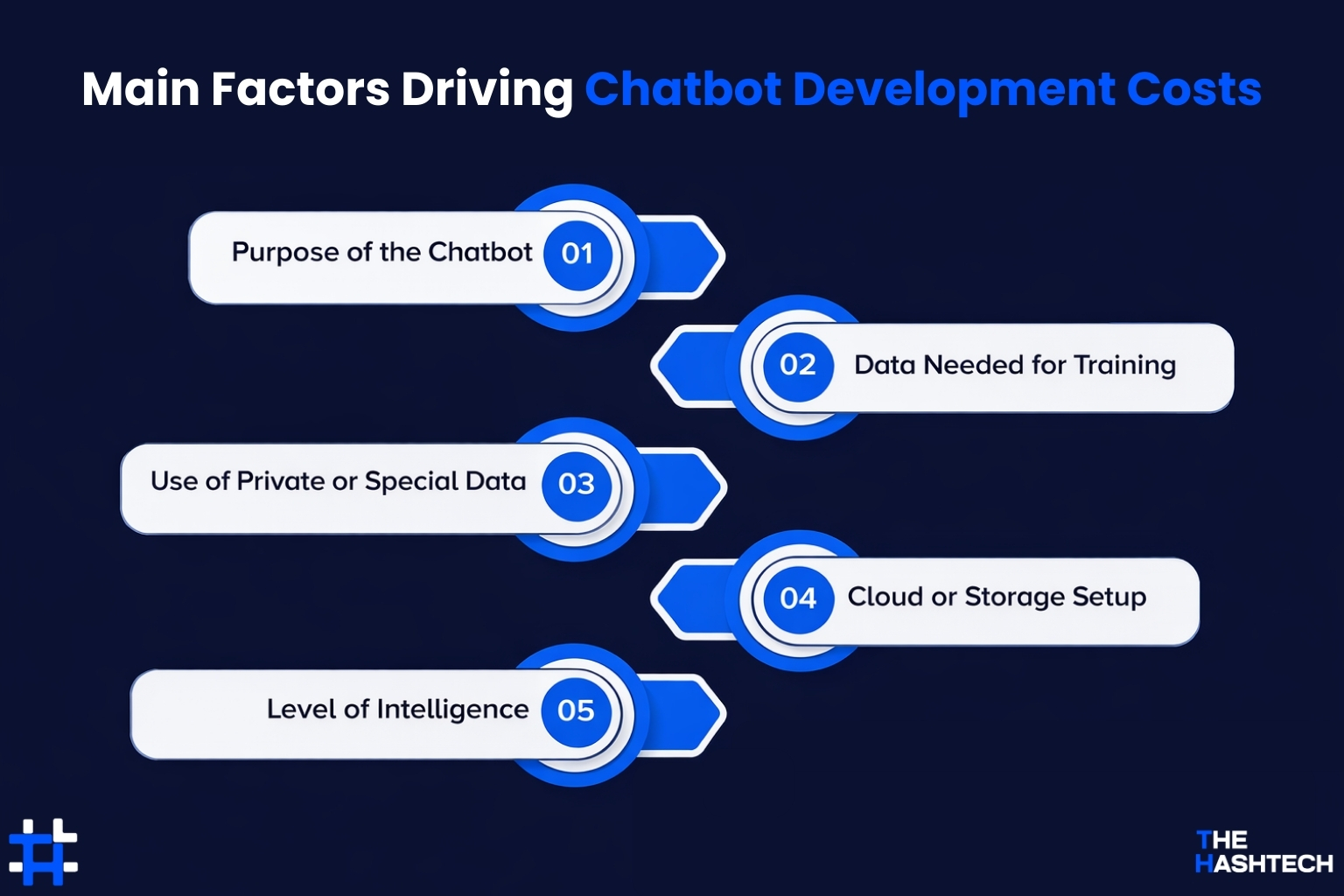
Purpose of the Chatbot
The main goal of the chatbot affects cost. For example, a simple FAQ bot costs less than a bot that handles customer service, makes recommendations, or interacts with multiple platforms. The more tasks it needs to perform, the more expensive it becomes.
Data Needed for Training
The type and amount of data you use to train the chatbot impact cost. Large datasets or specialized data (like medical or legal texts) require more processing power and cleaning, which adds to expenses.
Use of Private or Special Data
If the chatbot needs access to proprietary or confidential data, extra steps like data security, encryption, and compliance are needed. These increase development time and cost.
Cloud or Storage Setup
Where and how the chatbot stores data matters. Using secure cloud servers, databases, or on-premise storage with backups can increase costs, especially if high-speed or large-scale storage is required.
Level of Intelligence
The complexity of the chatbot like understanding natural language, handling multiple languages, or generating human-like responses affects cost. More advanced NLP features require better models and more computing power.
Also Read: Cost to Create an AI Chatbot App Like Ask AI
How to Reduce the Cost of Creating an App Like ChatGPT
Creating an AI chatbot is not easy. It takes skilled developers, advanced technology, and a lot of planning. But you can save money while creating a chatbot app like ChatGPT if you make smart choices. Here are some ways to do it:
Finding the Best Mobile App Development Partner
Picking the right partner for custom mobile app development can make a big difference. A good partner will help you build a reliable, high-quality app while saving you time and money. They can prevent costly mistakes, reduce the need for rework, and keep your project within budget. An experienced partner (like The Hashtech) knows the latest technologies and can guide you in optimizing costs, especially for projects like ChatGPT app development.
Build Smarter with MVP
The MVP, or Minimum Viable Product, is a smart way to build software or apps. Instead of creating a full-featured product right away, you start with only the most important features that your users really need. These core features are designed based on what customers want and how they use the app.
By using the MVP approach, you can save time and money, especially for AI-powered apps. You focus only on the features that matter, gather user feedback, and improve the product step by step. This way, you avoid spending on unnecessary features that people might not even use.
Going Cloud for Smarter AI Apps
Today, most businesses know that using cloud services is an easy way to cut costs. The same applies to AI chatbots. Training and running a chatbot requires a lot of data and computing power. By using a cloud provider, you can reduce development costs, scale easily, and focus on building smarter features instead of worrying about infrastructure.
From smart conversations to business automation, we’ll help you build the AI chatbot that fits your needs.
Want to Create Your Own Chatbot App Like ChatGPT?
Get Your Free Consultation!
Executive Guide to Building a Powerful AI Chatbot
If you’re a business leader, it’s important to know the key steps for creating an AI chatbot like ChatGPT. Here’s a clear roadmap to help you design a smart, effective chatbot that delivers real value to your users.
Set Your Business Goals
The first step is to clearly outline what you want your chatbot to achieve. Think about who will use it, what problems it should solve, the main features it needs, and how much you’re willing to spend. This helps guide the entire development process.
Do Your Market Research
Next, study the market to see what other AI chatbots are out there and how they perform. Understanding the competition and what users expect will help you build a chatbot that stands out and truly meets your audience’s needs.
Pick the Right Development Partner
Once you’re ready to build your AI chatbot, it’s important to find a development team that can make it happen. Look for a team experienced in AI and machine learning, with a strong track record and successful projects for other clients. This ensures your chatbot is built efficiently and effectively.
Build a Minimum Viable Product (MVP)
The next step is to create an MVP that has the chatbot’s essential features. This lets you test the chatbot with real users early on, gather feedback, and improve it over time by adding more advanced ChatGPT-style capabilities.
Test and Improve Your Chatbot
Once the MVP is ready, put the chatbot to the test with a small group of users. Look for any issues, see how well it handles conversations, and gather feedback. Use these insights to fine-tune the chatbot and make it smarter and more reliable.
Launch Your Chatbot
After testing and improving your chatbot, it’s time to release it to users. Keep a close eye on how it performs and collect feedback to make further improvements. Building a GPT-powered chatbot is a big project that needs both business insight and technical know-how. Next, let’s look at the key technical steps involved in creating an app like ChatGPT.
Step-by-Step Guide to Creating a Chatbot App Like ChatGPT
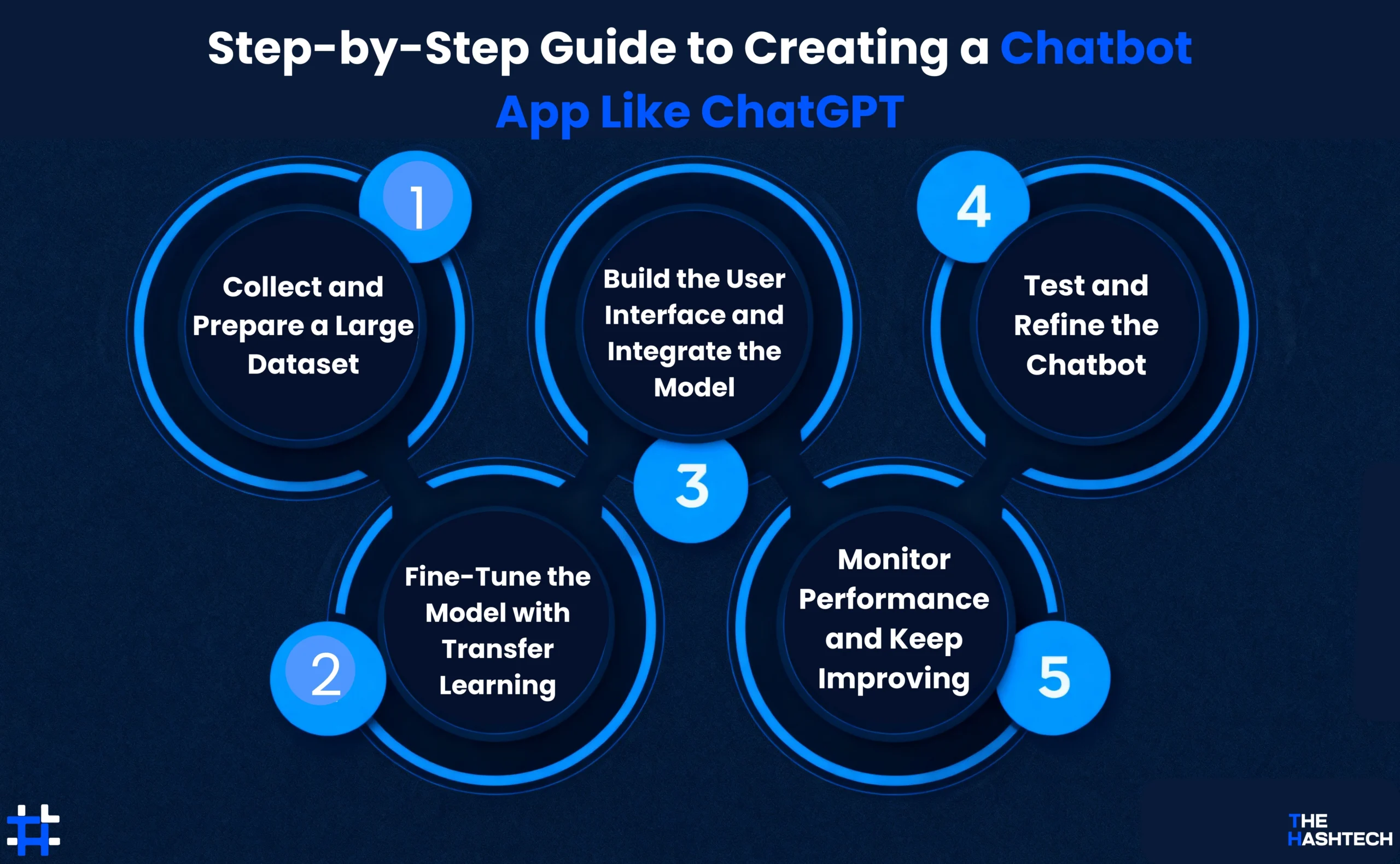
Step 1: Collect and Prepare a Large Dataset
The first step in creating a chatbot like ChatGPT is to gather a large and diverse dataset. This dataset should include different types of text conversations, articles, and other written content covering many topics and styles. Using a wide-ranging dataset helps your chatbot understand and respond better. Instead of starting from scratch, it’s best to use a pre-trained language model that’s already learned from huge amounts of text, and then adjust it for your needs. Popular datasets like Stanford’s GloVe provide word embedding numbers that represent the meaning of words helping the model understand language more deeply.
Step 2: Fine-Tune the Model with Transfer Learning
Next, you use transfer learning to adapt the pre-trained model into a conversational chatbot. Transfer learning means taking an existing model trained on one task and tweaking it for another, saving time and resources. For example, a model trained on general language tasks can be fine-tuned to chat naturally with users. This process improves the chatbot’s accuracy and understanding by building on what the original model already knows.
Step 3: Build the User Interface and Integrate the Model
After the model is ready, you need to create an app or interface where users can interact with the chatbot. This could be a web app like ChatGPT, a mobile app, or a chat feature inside another platform. You connect the AI model to this interface through APIs, so the chatbot can receive questions and send responses in real time.
Step 4: Test and Refine the Chatbot
Once the app is built, it’s important to test the chatbot thoroughly with real users. Collect feedback to find any errors, confusing answers, or areas where the chatbot struggles. Use this information to improve the model and make conversations smoother and more accurate over time.
Step 5: Monitor Performance and Keep Improving
After launching your chatbot, keep monitoring how it performs in the real world. Track user interactions and spot any new issues or changes in how people use the chatbot. Regular updates and retraining with new data will help your chatbot stay smart, relevant, and useful.
From engaging users to streamlining tasks, we’ll help you build a ChatGPT‑style app that fits your business.
Turn Ideas into a Chatbot App
Get Your Free Consultation!
At The Hashtech, We Know AI and Machine Learning
As leaders in technology, we’ve helped many clients grow faster and work smarter by unlocking the power of their data. Our AI development services turn hidden data into valuable insights.
From building AI-powered budget apps to helping a top European bank improve daily operations with intelligent automation, our skilled data scientists and engineers deliver results every time.
With AI and machine learning transforming business as we know it, generative AI consulting is more important than ever. It’s time to put AI to work for you. Reach out to us today to talk about your generative AI chatbot needs.
Frequently Ask Questions
Q: What’s the cost to create an app like ChatGPT?
Creating an app like ChatGPT can cost from around $500,000 to several million dollars. The price depends on things like how big the dataset is, what the chatbot will be used for, the features you want, and the services involved.
Q: How long does it take to create an AI chatbot?
The time needed can vary based on several factors, but usually, it takes anywhere from a few weeks to several months to develop an AI chatbot.
Q: How large does the dataset need to be to create an AI chatbot?
The size of the dataset depends on what you want the chatbot to do. For example, ChatGPT was trained on about 570GB of text data to learn language well.
Q: What factors affect the cost of creating an app like ChatGPT?
Several factors influence the cost, including training the AI model, integrating natural language processing (NLP), setting up cloud services, ensuring security, connecting third-party APIs, designing the user interface, and where your developers are located. The more advanced the features you want, the higher the overall cost.
Q: Can the cost of creating an app like ChatGPT be reduced?
Yes. You can save money by using pre-trained AI models, leveraging cloud-based services, starting with a minimum viable product (MVP), and hiring a professional app development company in more affordable regions.