How to Create a Chat App Like Discord?


26 January, 2026
Discord started as a project by Hammer & Chisel, a small game development company. Their games didn’t become very popular, but something good came out of that experience.
At the time, gamers often had problems with in-game voice chat. The sound quality was usually poor, and sometimes it was almost impossible to communicate clearly. The team at Hammer & Chisel noticed this issue. Since they already had experience in game development, they decided to create a separate voice chat platform made especially for gamers.
Today, Discord is much more than a gaming chat app. People use it for voice and video calls, sharing files, sending messages, and building online communities. In many ways, it offers similar features to platforms like Zoom and Skype.
If you want to learn how to create an app like Discord, this guide will walk you through everything you need to know. It explains:
- How Discord works
- The technology behind it
- Key features included in an app like Discord
- The cost involved in creating a similar chat application
Let’s begin your journey to creating an app like Discord!
What Is Discord?
Discord is a voice and chat application that lets people create their own private servers and connect with others online. It allows users to talk, share content, and build communities around common interests.
With Discord, users can create and manage servers, invite members, and exchange different types of content such as text messages, images, videos, music, and documents. It is widely used for communication, collaboration, and community building.
Discord offers different ways to communicate through channels:
- Text channels where users can send messages, share files, and post images
- Voice channels where users can talk or video chat in real time, with features like noise reduction for clearer sound
The platform works on many devices and systems, including Windows, macOS, Linux, and popular web browsers. Discord also provides mobile apps for both iOS and Android users.
Unlike some communication tools that limit storage or message history, Discord allows users to keep long chat records without extra cost. This makes it a strong alternative to platforms like Slack, especially for large communities.
Discord’s chat platform is known for its dark theme and easy-to-use design, which many people find enjoyable. One of the platform’s biggest strengths is its ability to support very large communities. You can grow your server to include thousands or even millions of members, and Discord has systems in place to help servers run smoothly, no matter how big they get. If a community becomes extremely large, Discord’s support can assist with optimizing performance for better reliability and speed.
In terms of usage, Discord continues to expand rapidly. As of 2025, the platform has about 689 million registered accounts, with around 259 million users active every month. Discord also earns significant revenue, generating hundreds of millions of dollars each year, mainly through its premium Nitro subscriptions and other paid features. These numbers show that Discord isn’t just a niche tool for gamers anymore, it’s a widely used communication platform for communities, students, creators, and professionals around the world.
Discover the key steps to creating a chat app like Discord with our easy-to-follow guide.
Ready to Get Started?
Begin Your Journey Today!
Discord: Growth, Popularity, and Impact
Imagine an app where you can chat, call, or video with friends, teammates, or people who share your interests. That’s Discord! Launched in 2015, Discord was created by gamers for gamers, aiming to make online communication easier and more fun.
The platform quickly became popular among gamers but didn’t stop there. It opened its doors to everyone music fans, book lovers, artists, entrepreneurs, and more.
Today, Discord is one of the top communication apps in the world, with a huge user base of over 514 million people, making it a go-to place for building communities and connecting with others.
Creating an App Like Discord: How It Makes Money
Ever wondered how Discord earns money while staying free for millions of users? Discord uses a freemium model, which lets people use the app for free while offering extra features for those who want more.
The basic features like chatting, creating servers, and joining communities are completely free. But for advanced options, users can subscribe to Discord Nitro.
Nitro gives perks such as better video and screen sharing quality, custom emojis, and enhanced server tools. This way, Discord keeps its platform accessible to everyone while also generating revenue and improving the experience for power users.
Essential Features for a Chat App Like Discord
Discord became popular quickly because of its smart and engaging features. Today, it stands out as one of the top apps for chatting, voice calls, and community building.
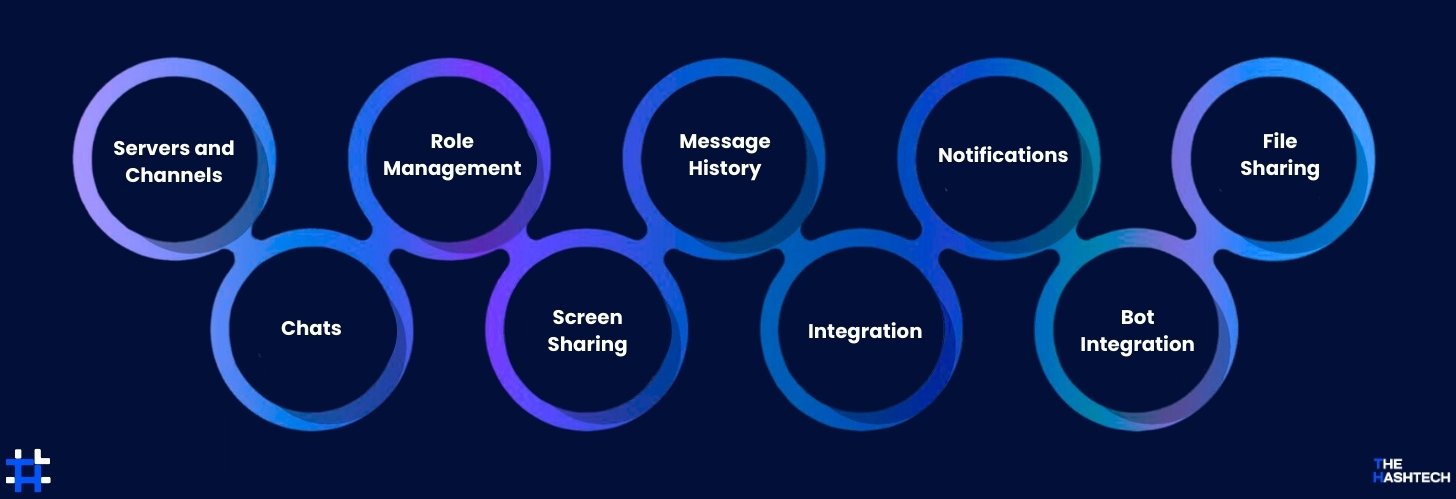
If you want to create a chat app like Discord, there are some key features you should include. These are the must-have tools that make users stay, interact, and enjoy the platform.
Servers and Channels
People use servers and channels to talk and share with others. Each Discord server can have up to 500 channels. There are thousands of servers on Discord, covering almost any topic you can imagine.
If you don’t find a server you like, you can create your own and invite people through social media. Users can also chat privately or in public channels to discuss specific subjects quickly and easily.
Chats
Discord was first made for voice communication, but text chatting is also possible. It supports voice and video calls, and some channels are only for voice with no text messages. People can join different channels and start talking or listening in just a few clicks.
If you want to make a video chat app like Monkey, you will also need to focus on good video quality.
Role Management
In a server or channel, admins can give roles to members. These roles decide who can read messages, send messages, or join channels. Permissions can be set for all channels at once or for each channel separately.
Discord has about 30 different permission options, which can be combined in many ways. This flexibility in managing channels and roles is one of the most attractive features of Discord.
Screen Sharing
Screen sharing is an important feature for video chat apps like Discord. It lets users show their computer or phone screen to others during a conversation, making communication easier. Many apps, including Discord, offer screen sharing to help participants share ideas and collaborate more effectively.
Message History
If you want to create a chat app like Discord, it’s important to let users store messages for a long time and search through old conversations.
Some apps delete messages automatically after a while to save space. While text messages are small, they can add up over time. For business use, old messages may be very important, so keeping a history is useful.
Integration
Connecting your app with other services and accounts might not seem very important, but it can make your app much more useful.
Let users link their social media accounts to your app. If your app is for gaming, adding Steam or Twitch integration can be a big plus. You can also connect your app with business tools and platforms to help professionals work more efficiently.
Notifications
Notifications are a basic feature in every chat app. A modern messaging app should let users control them, either completely or partially. This way, people can avoid distractions from message sounds during meetings, school, or work. For example, apps like Discord let users mute all notifications or just specific channels and groups.
Bot Integration
Bots are programs that can perform tasks automatically. Admins can add them to servers to make the app more useful. For example, Medalbot on Discord helps users record live gameplay videos easily.
File Sharing
Almost all modern chat apps let users share files, so it’s important to include this feature. For example, Discord allows file uploads up to 8 MB, while Nitro users can upload files up to 50 MB. Sharing bigger files needs stronger servers, so you should think about your users’ needs and set file size limits accordingly.
Step-by-Step Guide to Creating an App Like Discord
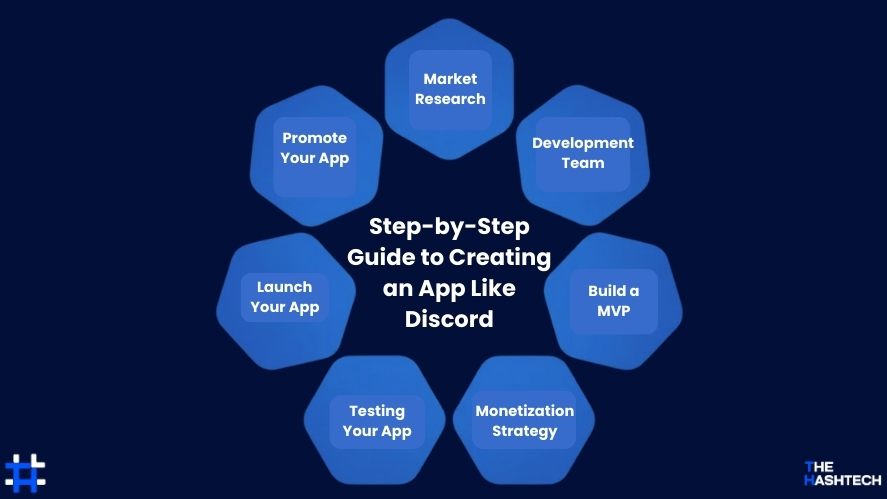
Thinking about creating an app like Discord? By the end of this guide, you’ll understand how a chat app like Discord works and what goes into building one.
1. Perform Detailed Market Research
Before creating a chat app like Discord, the first step is to understand your audience deeply through detailed market research.
You can divide your research into two key areas:
User Demographics: This helps you know who your users are. For example, find out their age, location, preferred devices, and other basic information about how they use technology.
User Behavior: This shows how your audience interacts with apps. Identify which features they like, what steps they take most often, and what parts of an app they usually skip.
Next, look at your competitors in the VoIP (Voice over Internet Protocol) space. List them out and see what they offer. Understand which audience they focus on and what makes them unique.
A SWOT analysis can help here it highlights the strengths, weaknesses, opportunities, and threats of your competitors.
Finally, take all this information and apply it to your app. Use it to create unique features and design decisions that make your app stand out in the market.
2. Choose the Right Development Team
After completing your market research, the next important step is to find a reliable software development team.
Different tasks need different experts, so it’s essential to pick a mobile app development company that has a versatile team capable of handling multiple technologies and project types.
For building an app like Discord, your team should include:
- App Developers for both Android and iOS
- UI/UX Designers to create a smooth user experience
- Quality Assurance (QA) Specialists to test the app thoroughly
- Project Managers to keep everything on track
- Support and Maintenance Staff to handle updates and fixes
Once you select the company, start discussing your ideas and expectations. Talk about all the features you want in your app and any specific functionalities.
In short, a good development company will guide you in choosing the right tools, features, and strategies for creating a successful voice chat app like Discord.
3. Build a Minimum Viable Product (MVP)
It’s a smart idea to start with an MVP a basic version of your app with only the essential features. This helps you test how well your app works and see how users interact with it.
By observing what users like and don’t like, you can gather valuable feedback. Use this information to improve your app, remove unnecessary features, and focus on what your users truly want.
4. Choose the Right Monetization Strategy
Picking the best way to make money from your app can be tricky.
Start by understanding your users and what they prefer. This will help you decide which monetization approach works best for a chat app like Discord.
Here are some popular strategies:
Freemium
With the freemium model, users can access the basic version of your app for free. Advanced features or extra tools are unlocked through a small payment.
Advertising
Promoting your app is one of the easiest ways to reach more users and earn money. You can use both free and paid advertising methods. Paid ads often give faster results, but you need to plan your advertising carefully and spend wisely to get good results.
Subscriptions
With a subscription model, you can give users access to special features in your app for a limited time. This encourages them to keep using the app and can lead them to pay for ongoing access to your services.
5. Thorough Testing Your App
Testing is very important to make sure your app works well and meets user expectations. You should check your app in different ways, such as:
- Usability and feasibility tests – see if users can easily use the app and if it makes sense.
- Function and performance tests – make sure all features work and the app runs smoothly.
- Stress and load tests – check how the app performs under heavy use.
- Compatibility and integration tests – ensure it works on different devices and with other systems.
6. Launch Your App in App Stores
Once your MVP is built and thoroughly tested for performance, usability, and functionality, it’s ready to be published in app stores.
After the launch, the development team will collect user feedback, track engagement, and gather insights to improve the app in future updates.
7. Promote Your App
After launching your voice chat app, it’s important to let people know about it. Marketing your app well can help you reach more users and grow quickly.
Here are some effective ways to promote your app:
- Run creative marketing campaigns – Try unique ideas that grab attention.
- Give early users special perks – Offer premium features to the first few customers for a limited time.
- Plan marketing events – Organize online or offline events to showcase your app.
- Leverage social media – Share updates, tips, and stories to get people talking.
- Host launch events – Introduce your app to a larger audience and generate buzz in mainstream markets.
Tech Stack Behind Discord
Many people ask, “What technologies power Discord?”
Discord, a cloud-based voice chat app, is built using modern tools and follows a client-server architecture. It uses WebRTC, a real-time communication technology, which helps the app work on multiple platforms and lets developers reuse code efficiently.
Frontend Development
Discord’s front-end is mainly built with JavaScript, which helps make the app interactive and dynamic.
It also uses React.js, a popular JavaScript library, to create smooth and responsive user interfaces. React’s component-based system allows for faster UI development and quick updates.
To manage data across the app, Discord uses Redux. It helps keep the app’s state organized and predictable, improving both performance and user experience.
Backend Development
Discord’s back-end is mainly powered by Node.js, a JavaScript runtime that runs on the server. Node.js makes it easy to build scalable and fast server-side systems, which helps with real-time communication and quick data processing.
Python is also used for some back-end tasks, like managing websockets, handling database connections, and running tasks in the background without slowing down the app.
DevOps
Discord uses Docker to package its app into containers, which helps ensure a consistent and portable environment for deployment. This makes it easier to scale, deploy, and manage the app’s infrastructure.
For managing and scaling those containers, Discord relies on Kubernetes. It helps run and organize containerized applications across different servers or clusters, making everything run smoothly and efficiently.
Encryption
Discord uses SSL/TLS to secure communication between users and servers. These encryption protocols make sure the data exchanged is safe and private.
For protecting messages with end-to-end encryption, Discord relies on AES (Advanced Encryption Standard). AES is a strong and trusted encryption method that ensures your messages stay secure while being sent.
APIs
Discord offers its own API, which allows developers to add Discord features to their apps or services. This API lets them access chat, user management, voice channels, and more.
Discord also connects with several third-party APIs to add extra features. For example, it uses OAuth for secure login and user authentication, media APIs for sharing and playing files, and webhooks for sending event notifications.
Audio and Video Calls
Discord uses WebRTC (Web Real-Time Communication) to power audio and video calls. WebRTC provides the tools and protocols needed for real-time communication directly in web browsers.
For high-quality voice calls, Discord relies on the Opus codec. This widely-used codec ensures clear, efficient audio during calls, even in noisy environments.
The technologies we’ve discussed give you an idea of the powerful tech stack behind Discord. By combining tools for front-end, back-end, DevOps, encryption, APIs, and audio/video features, Discord is able to offer a smooth and feature-packed communication experience to millions of users. You can either use this tech stack or draw inspiration from it when building your own app similar to Discord.
Schedule a free one-on-one session with our mobile app experts to get cost estimates and talk through your app’s features.
Thinking of creating a chat app like Discord?
Let The Hashtech guide you every step of the way!
How to Create an App Like Discord: A Guide to the Costs Involved
So, you’re thinking about creating an app like Discord, one that connects people, builds communities, and offers great features. That’s an exciting idea! But before you jump in, it’s important to understand what goes into creating an app like Discord and more importantly, the costs involved.
Creating a successful app like Discord isn’t something that happens overnight. It requires careful planning, thoughtful design, skilled development, and reliable infrastructure. Along the way, you’ll need to think about many things: the app’s design, how it will be built, the servers that will power it, security measures to protect users, and ongoing updates to keep everything fresh.
Let’s break down the key things you’ll need to think about, and how they impact the overall cost:
Design and Development Costs
Building an app like Discord requires a significant investment in both design and development. These are crucial stages that determine how your app looks and works, as well as how users experience it.
When it comes to design, the goal is to create a clean and attractive user interface (UI) that draws people in and a smooth user experience (UX) that makes the app easy to use. A good design ensures that the app is both visually appealing and simple to navigate, so users stay engaged.
The development phase is all about turning ideas into reality. It involves writing the code, creating features, and setting up servers to handle the app’s functions. If your app is packed with advanced features like voice chat, video calls, and live streams, the development costs can go up. The more complex the features and the design, the more time and expertise is needed, which means a higher cost to create an app like Discord.
Infrastructure and Server Costs
Next up is the infrastructure and servers that keep your app like Discord running smoothly. These are the unseen components that support everything from voice calls to text messages, ensuring your app works without a hitch, even with millions of users online at the same time.
To build an infrastructure that can handle all this, you need to consider things like server costs, cloud storage, load balancing, and content delivery networks (CDNs). These systems ensure that data is delivered quickly and reliably to users, no matter where they are.
How much you’ll pay for infrastructure depends on a few factors like how many people you expect to use the app, the complexity of the features, and how spread out your users are around the world. As your community grows, you’ll need to scale up your infrastructure to keep everything running smoothly, without slowing down the experience for users.
Maintenance and Ongoing Updates
Once your app like Discord is live and users are enjoying it, the work isn’t over. To keep your app running smoothly, safely, and up-to-date, regular maintenance and updates are a must. This includes things like hosting fees, server upkeep, monitoring performance, fixing bugs, adding security updates, and rolling out new features.
You’ll need a team of experts to handle these tasks and make sure everything keeps working as expected. It’s important to plan for these ongoing costs from the start, so your app remains reliable and continues to grow. Without regular updates and attention, your app could face issues that hurt user experience, security, or performance.
Ways to Save Costs in Creating an App
After looking at the different costs involved in creating an app like Discord, let’s dive into some smart ways to cut down on expenses while still maintaining a high-quality app.
Focus on Essential Features First
Identify the key features that are absolutely necessary for your app to work properly, and make them a priority during development. This helps you use your resources wisely and avoids spending money on unnecessary features that aren’t critical, especially when creating an app like Discord.
Use an Agile Development Approach
Adopt an agile method for development, where you build and improve your app step by step, getting feedback regularly. This helps you add features gradually, cuts down on costs, and lets you adjust to user needs and market trends more easily when creating an app like Discord.
Use Cloud Services
Take advantage of cloud platforms like AWS or Google Cloud to keep initial infrastructure costs low. Cloud services offer flexibility and scalability, letting you pay only for what you use and easily scale up as your user base grows. This approach helps you save money and adjust resources as needed.
Use Reusable Components and Open-Source Tools
Make use of reusable components and open-source frameworks to speed up development and cut down on costs. By using ready-made solutions, libraries, and tools, you can save time and effort instead of building everything from the ground up.
Start with an MVP (Minimum Viable Product)
Think about launching a basic version of your app with just the essential features. This lets you get feedback from users early on, test your idea, and improve the app over time. It helps lower your initial costs and reduces the risks of building something that might not meet user needs.
Outsource or Use Offshore Development
If you’re working with a tight budget, consider hiring skilled developers or teams from regions where costs are lower. This can help you save money while still getting quality work. Just make sure to set up clear communication, teamwork, and quality checks to ensure the development process runs smoothly.
How to Create Money from an App Like Discord?
Discord mainly uses three popular methods to generate revenue. These are the most common strategies for monetizing an app like Discord.
Subscription Model
Discord makes money through its premium subscription, called Discord Nitro. It usually costs $9.99 per month or $99.99 per year, with a 30-day free trial. This subscription model is similar to Netflix’s, and it’s great for attracting business professionals and tech enthusiasts who want extra features and customization.
Funding
Another way Discord generates significant revenue is through funding. For example, by December 2020, Discord’s value was estimated at $7 billion thanks to successful fundraising efforts. This model helps secure large investments to fuel growth and development.
Merchandise Store
Discord also makes money through its online store, where users can buy branded items like t-shirts, socks, sweatshirts, and more. It’s a fun way to engage with the community while generating extra revenue.
Why Choose The Hashtech as Your Development Partner?
Creating a VoIP chat app like Discord isn’t simple. There are many things to consider the technology behind group calls is constantly changing, and you also need to ensure top-notch data security, reliable servers, and strong backends. It’s a complex process.
If you’re looking to create an app like Discord and aren’t sure where to begin, The Hashtech can help. We’re a trusted mobile app development company San Francisco, with a team of skilled IT professionals who have years of experience in both web and mobile development.
Our apps are responsive, user-friendly, and engaging. We follow the Agile development process to keep projects on track and ensure they meet your goals. Our quality assurance team makes sure everything runs smoothly and bug-free.
For example, we recently helped Innovative Eyewear build a voice-based social media app. This app allowed users to send and receive audio messages via Bluetooth wearables, and post voice updates to platforms like Twitter and Facebook. The project was a success and helped our client secure $1 million in funding.
If you’re thinking about building something similar, reach out to us. We’d love to help turn your idea into reality!
Conclusion
We hope this guide has given you a clear understanding of how to build a video chat app like Discord. By now, you’ve probably seen how important a unique and creative idea can be in the app development process. Plus, since the VoIP app space is still growing, there’s a lot of room for fresh, innovative concepts that users will love.
If you’re ready to bring your VoIP app idea to life, partnering with a mobile app development company like The Hashtech is a great way to get started. We’re here to help you every step of the way!
With over $200 million in revenue, it’s the perfect moment to create an app like Discord and tap into its full potential.
Transform Your Idea into a Profitable Chat App
Reach out to our experts today!
FAQs (Frequently Asked Questions)
Why is Discord so popular?
Discord has become very popular for several reasons. First, it’s a free messaging platform that offers great features and functions.
One of the main attractions is its free VoIP service, which allows clear voice calls. It also provides excellent video and chat services, making communication easy.
Another reason is its popularity among gamers, as it allows players to communicate while playing multiplayer games.
Additionally, Discord isn’t just for gamers it also offers powerful communication tools for businesses and larger teams, making it a versatile platform for a wide range of users.
Is it possible to create an app like Discord on a tight budget?
Yes, it’s definitely possible to create an app like Discord with a smaller budget. The key is to start with the essential features and expand as you go. Focus on the core functions that users need, use open-source tools and frameworks, and take advantage of affordable cloud services to keep costs down. By doing this, you can manage expenses while still creating a solid app.
Can I make money from my app like Discord just with ads?
Yes, you can use ads to make money from your app, but it’s important to find a balance. Too many ads can annoy users and hurt engagement. It’s a good idea to combine ads with other revenue options like in-app purchases, subscriptions, or premium features to create more ways to earn money.
How can I protect user data in my app like Discord?
To keep user data safe and private, use strong encryption methods like SSL/TLS for secure communication between users and your servers. Follow best coding practices, set up solid authentication and authorization processes, and make sure to regularly update your app to fix any security issues that come up. This will help protect both your app and its users.
Can I add third-party APIs to my app like Discord?
Yes, you can definitely integrate third-party APIs to add more features to your app. Discord itself offers an API that lets developers expand its functionality. You can also use other APIs for things like user authentication, media sharing, or connecting with social media platforms. Just make sure to read and follow the API provider’s terms and privacy policies.
How long does it take to create an app like Discord?
On average, it takes about 6 to 8 weeks to develop a messaging app like Discord. However, if your app includes more complex features or functions, the timeline may be longer.
What should I focus on during app testing and launch?
During testing, make sure to check your app on different devices, operating systems, and use cases to find and fix any bugs or issues. It’s also helpful to get feedback from beta testers or a small group of users to see what might need improvement. Focus on performance, security, and making the app easy to use.
For the launch, have a clear marketing plan to build excitement, raise awareness, and attract early users. After launching, keep an eye on user feedback and engagement so you can continue making improvements.